

Setting up a MIG welder is simple when you follow the right steps. In this guide, you’ll learn how to prepare your welder, adjust settings, and start welding safely. Get ready to start welding with confidence!
How to Set Up a MIG Welder
If you’re new to welding or just bought a MIG welder, setting it up correctly is crucial. Proper setup ensures safety, better welds, and longer equipment life. In this comprehensive guide, you’ll learn step-by-step how to prepare your MIG welder for use, adjust settings, and start welding confidently. Let’s get started!
Key Takeaways
- Understand your MIG welder: Learn the main components and functions before setup.
- Safety first: Always wear protective gear and ensure proper workspace setup.
- Prepare your workspace: Clear area, good ventilation, and secure grounding are essential.
- Set up the equipment: Connect the power, gas supply, and install the wire spool correctly.
- Adjust welding parameters: Set voltage, wire feed speed, and gas flow for optimal results.
- Test your setup: Practice on scrap metal to fine-tune your settings before working on the main project.
- Maintain your welder: Regularly clean and inspect to ensure longevity and safety.
Understanding Your MIG Welder
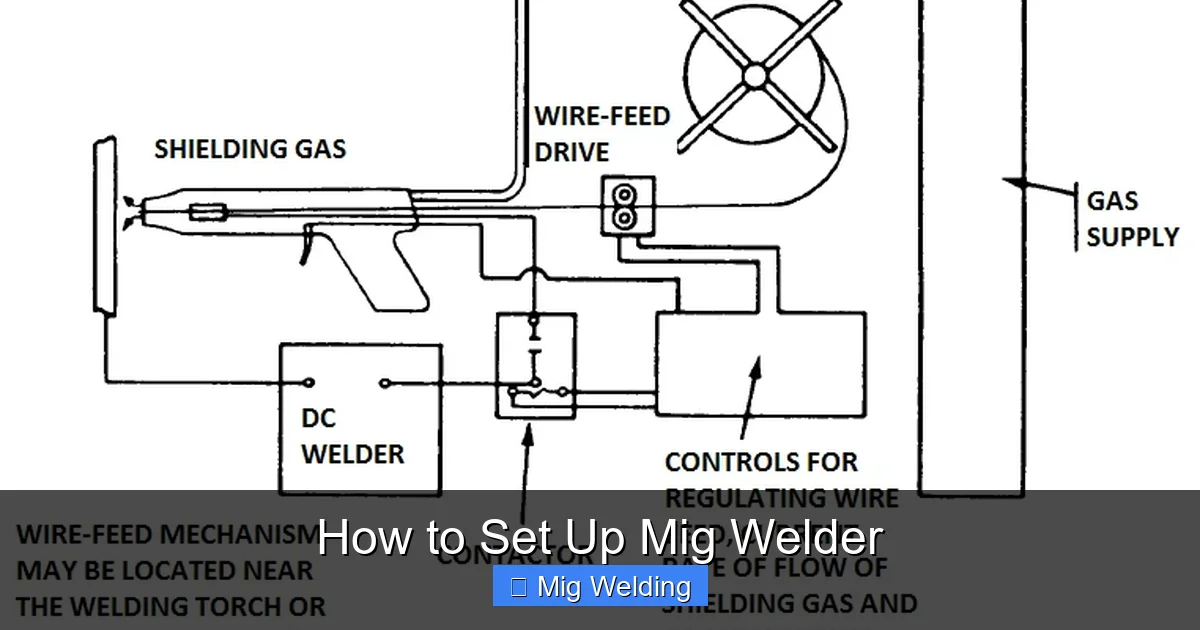
Before diving into the setup process, it’s important to understand the main parts of a MIG (Metal Inert Gas) welder. Knowing these will help you follow instructions more easily and troubleshoot issues later.
Main Components
- Power source: Provides the electrical energy needed for welding.
- Wire feed system: Feeds the consumable wire electrode through the gun.
- Welding gun: The tool you hold to direct the wire and shielding gas onto the workpiece.
- Gas supply: Usually a cylinder of inert gas (like argon or a mix) that shields the weld area.
- Control panel: Allows you to set voltage, wire feed speed, and other parameters.
Safety Precautions
Welding involves high heat, bright light, and potentially harmful fumes. Always prioritize safety:
Visual guide about How to Set Up Mig Welder
Image source: contentgrid.homedepot-static.com
- Wear protective gear: Welding helmet, gloves, long-sleeve shirt, and safety glasses.
- Work in a ventilated area: Ensure proper airflow to avoid fumes buildup.
- Secure your workspace: Keep flammable materials away and work on a stable surface.
- Check your equipment: Inspect cables and connections for damage before use.
Preparing Your Workspace
A clean, organized workspace makes setup easier and welding safer.
Visual guide about How to Set Up Mig Welder
Image source: orangetractortalks.com
- Clear the area: Remove clutter and flammable items.
- Good lighting: Make sure you can see your work clearly.
- Proper grounding: Connect the ground clamp to a clean, bare metal surface.
- Ventilation: Open windows or use exhaust fans to clear fumes.
Connecting and Setting Up the MIG Welder
Step 1: Power Connection
Plug your welder into a grounded power outlet. Check the voltage requirements in your welder’s manual to match your power supply.
Visual guide about How to Set Up Mig Welder
Image source: i2.wp.com
Step 2: Attach the Gas Cylinder
- Secure the gas cylinder upright in a well-ventilated space.
- Attach the regulator and flow meter to the cylinder valve.
- Connect the gas hose from the regulator to the welder’s gas inlet.
- Open the gas cylinder valve slightly and check for leaks.
Step 3: Install the Wire Spool
- Open the wire feed mechanism on your welder.
- Place the wire spool onto the spool holder, ensuring it unwinds in the correct direction (usually clockwise).
- Feed the wire through the liner and guide rollers according to your machine’s instructions.
- Close the feed mechanism and tighten everything securely.
Step 4: Connect the Welding Gun
- Attach the gun to the welder’s output terminal.
- Secure the contact tip inside the gun, matching the wire size.
- Ensure the nozzle is clean and properly fitted.
Adjusting Welding Settings
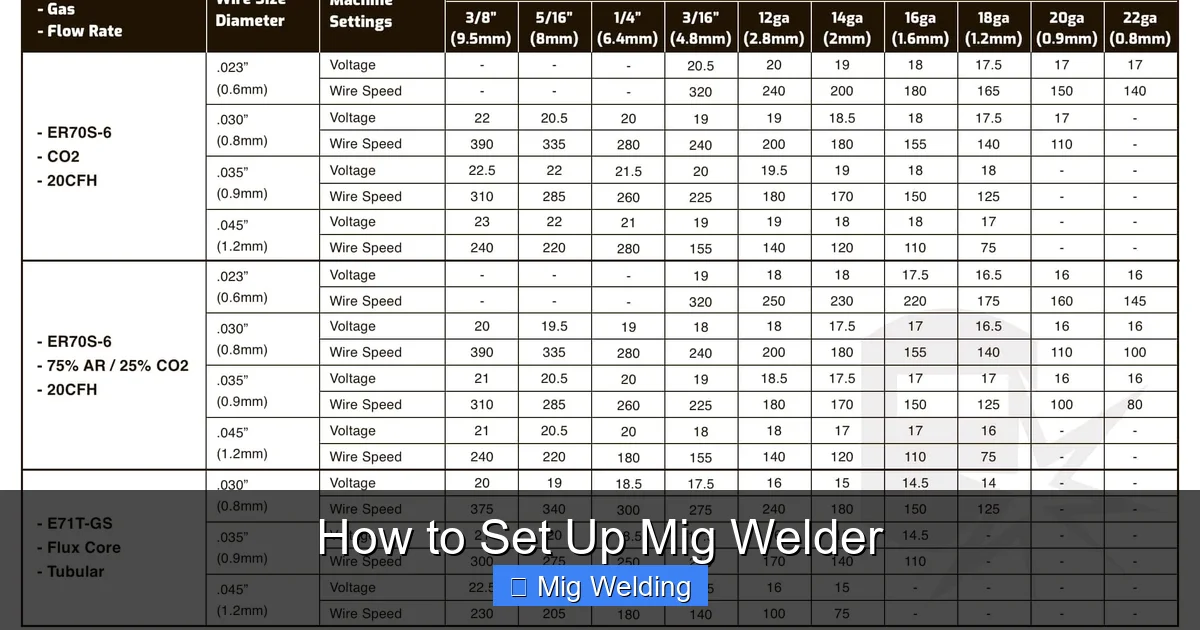
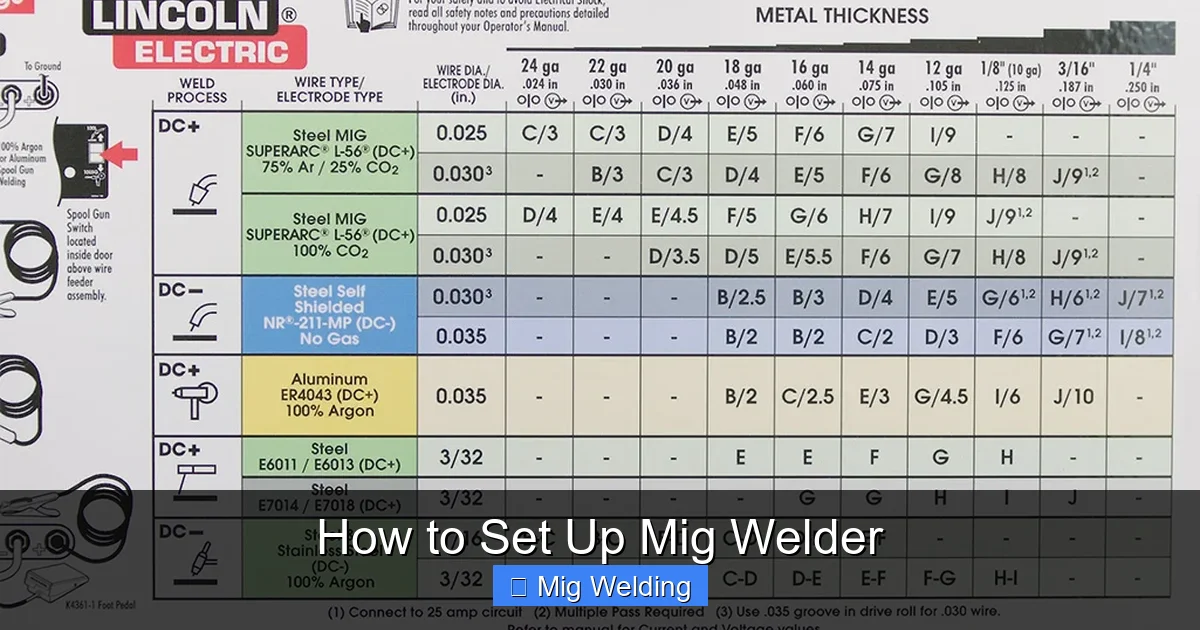
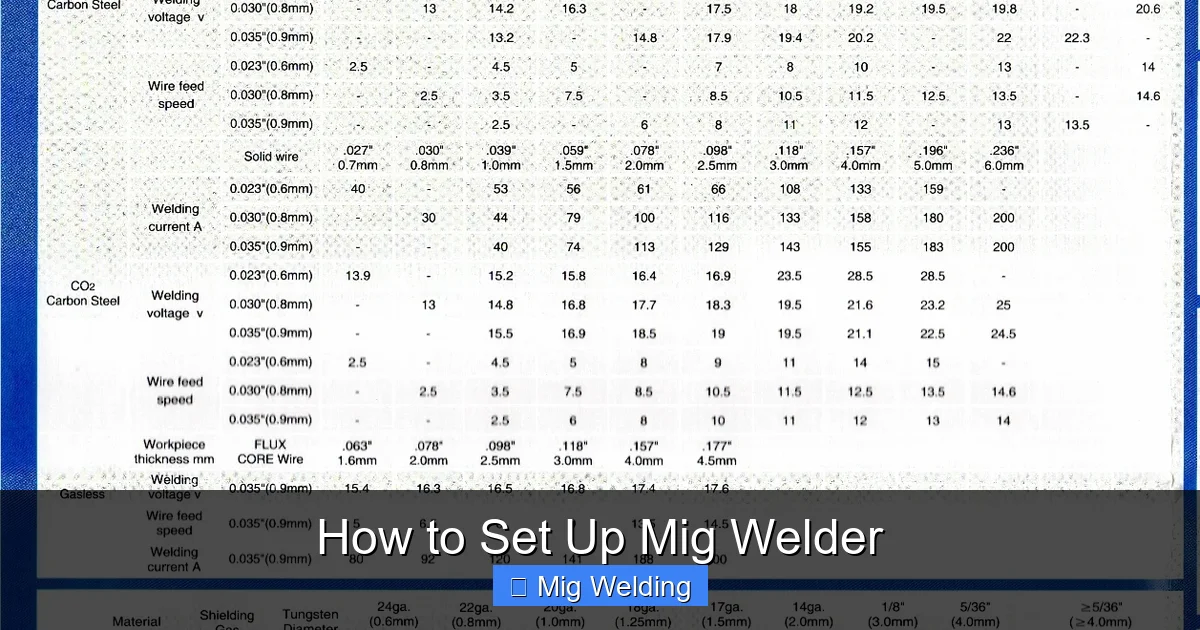
Proper settings are key to a quality weld. Start with manufacturer recommendations and fine-tune based on your materials and conditions.
Step 1: Set the Voltage
Use the control panel to set the voltage. Higher voltage produces a hotter arc, suitable for thicker materials.
For thin metal, lower voltage works better to prevent burn-through.
Step 2: Set the Wire Feed Speed
This controls how fast the wire is fed into the weld pool. Too fast can cause spatter; too slow results in weak welds. Adjust based on your wire size and voltage.
Step 3: Adjust Shielding Gas Flow
Set the gas flow between 20-30 cubic feet per hour (CFH). Too high can cause turbulence; too low may not shield properly.
Performing a Test Weld
Before starting your project, it’s wise to test on scrap metal.
- Place a small piece of scrap metal in a safe area.
- Hold the gun at about 1/4 inch from the surface.
- Pull the trigger and observe the weld puddle.
- Adjust voltage and wire feed as needed for a smooth, consistent weld.
Troubleshooting Common Issues
- Porosity or holes in weld: Check gas flow and leaks, clean work surface.
- Spattering: Reduce wire feed speed or voltage.
- Poor penetration: Increase voltage or wire speed.
- Wire sticking: Check for proper wire tension and clean contact tip.
Maintaining Your MIG Welder
Regular maintenance keeps your welder in top shape:
- Clean the contact tip and nozzle after each use.
- Inspect the gas hose and connections for leaks.
- Lubricate moving parts if recommended by the manufacturer.
- Store the welder in a dry, safe place.
Conclusion
Setting up a MIG welder might seem daunting at first, but with these simple steps, you’ll be welding confidently in no time. Remember to always prioritize safety, test your settings, and maintain your equipment regularly. Practice makes perfect, so don’t hesitate to experiment on scrap metal before tackling your main project. Happy welding!
